
29 MB · Android 8+
Tiger Exchange APK Download — Quick 4-Step Sideload on Android 8 and Newer, One Toggle
The Tiger Exchange APK download is a single 29 MB file for phones running Android 8 or newer. Allow your browser to install unknown apps, open the file, tap Install, then sign in with the user ID you already have. Nearly every failed install traces back to that one permission, not to the file itself.
Get the 29 MB Tiger Exchange APK Ask the Desk to Resend the File
Tiger Exchange APK First Open — Easy Sign-In With the ID You Already Hold
This is what greets you the moment the Tiger Exchange APK finishes installing. Nothing to register again. The user ID and password you type on the Tiger Exchange website go into these two boxes exactly as they are, capitals included.
Lost track of which ID is yours? The Tiger Exchange login page has the recovery route, so sort that out before you sideload anything.
Tiger Exchange APK Download — The Free 29 MB File and the Toggle That Stops It
What the Tigerexch APK actually is
Twenty-nine megabytes. That is the entire Tiger Exchange APK, and the figure is more useful than it looks, because it is your first check on whether the download worked at all.
A finished file that shows only a few KB in your Downloads folder is not the Tiger Exchange APK. It is almost always an error page that the browser saved under an .apk name, and Android will refuse it. Delete it and fetch again. The Tigerexch APK is the same sportsbook you open in Chrome, packed as an app: cricket odds, the casino floor and the cashier all sit behind the one Tiger Exchange login, and nothing about your balance lives on the phone itself.
Sent this link to a friend on an iPhone? It will not help them, sadly (an .apk is Android-only, full stop). Point them to the Tiger Exchange app for iPhone and Android instead, which covers their route.
The unknown sources toggle, and how to clear it
Older Android had one master switch called Unknown sources. From Android 8 onward that switch was split up: each app that hands you a file needs its own permission, so Chrome, Samsung Internet and your Files app are all separate. That change is why a Tiger Exchange APK download can finish perfectly and still refuse to open.
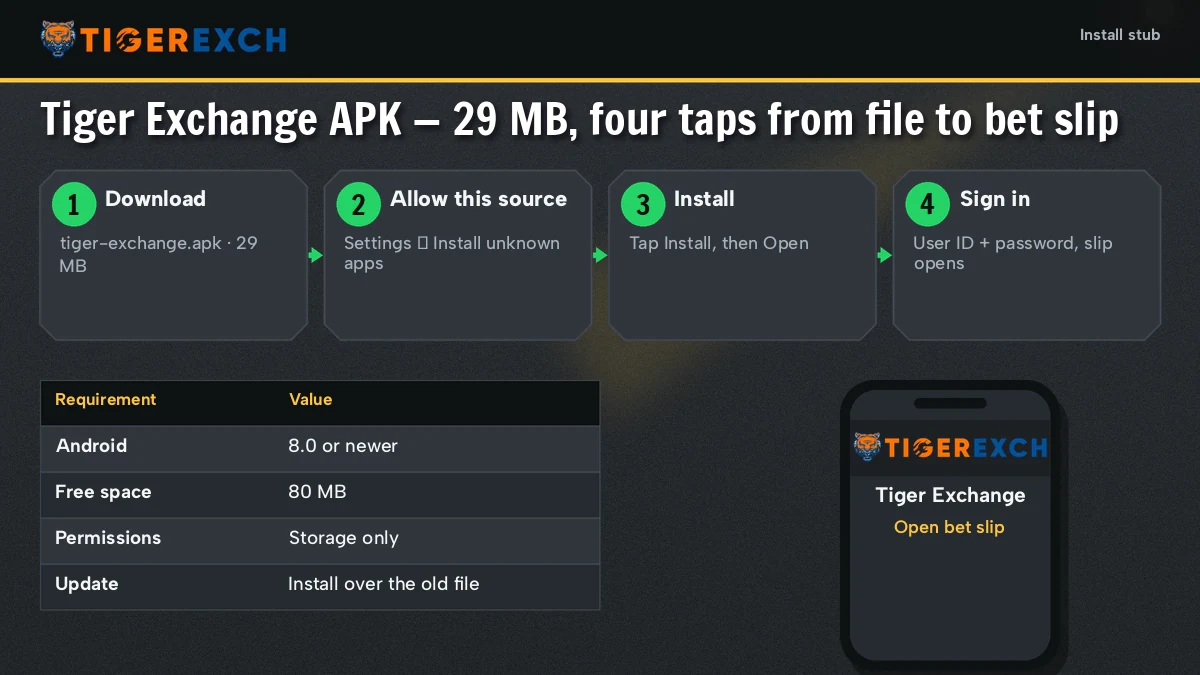
The path, roughly: Settings, then Apps, then the browser you downloaded with, then Install unknown apps, then Allow from this source. Menu names drift by maker. On a Samsung it sits under Special access; on Xiaomi phones a pop-up usually offers the shortcut the first time you tap the file, which is easier then hunting for it.
Toggle on, install, toggle off. The Tiger Exchange app does not need the permission to run afterwards. Switching it back means the next stray .apk from a chat group cannot slip in quietly.
Expect one more prompt. Google Play Protect flags every file that did not come from the Play Store, the Tiger Exchange APK included, and the wording sounds scarier than the situation usually is. Read it, check the size against 29 MB, check where the link came from. Then decide.
The 4-step Tiger Exchange APK install, ticket by ticket
- Download. Hit the Tiger Exchange APK link up top. Wait for the progress bar to reach 29 MB before touching anything else.
- Open. Pull down the notification shade and tap the Tiger Exchange file there. A block message here is the toggle from above; follow its Settings link, flip it, press back.
- Install. Back on the prompt, tap Install, then Install anyway if Play Protect asks. Keep the screen on until it says App installed.
- Sign in and switch off. Open Tiger Exchange, type your user ID and password, then return to settings and turn the permission off.
Still stuck after step three? These are the three messages we see most, and what each one tends to mean:
- App not installed. An older Tiger Exchange build is already on the phone, signed differently. Uninstall it first, then run the new file.
- There was a problem parsing the package. On Tiger Exchange installs we trace this to two things: an Android 7 handset, or a download that died partway, at 11 MB say. Long-press the file and read its details. Short of 29 MB means fetch it again.
- Install does nothing when tapped. A screen overlay is in the way: chat bubbles, a blue-light filter, a screen recorder. Close it and tap again.
Tigerexch App Download APK vs a Tiger Exchange APK Old Version — the Safe Pick
Two kinds of file float around. One is the current Tigerexch app download APK, the 29 MB build linked from this page and resent by the Tiger Exchange desk when asked. The other is whatever someone forwarded in a group last season, often renamed, sometimes a different size, with no way to tell who rebuilt it.
People go hunting for a Tiger Exchange APK old version for understandable reasons. A phone that will not take the new one. A layout they liked better. In practice the old file causes more trouble than it solves: it will not update cleanly, Android often rejects the new build on top of it, and you cannot check it against anything.
Our view is simple, and we would repeat it to anyone. Use the current file. If an older copy is already on the phone, remove it before installing; your Tiger Exchange balance, open bets and history stay on the account, so the uninstall costs nothing but a sign-in.
And if the phone is genuinely too old for Android 8? Then no APK of any vintage is the answer. Open Tiger Exchange in the phone browser instead. Same ID, same balance, no file at all.
Your first sign-in inside the Tiger Exchange APK
- Type the ID as issuedTiger Exchange user IDs are matched exactly, so a capital that autocorrect slipped in will fail. Turn autocorrect off for that one box if it keeps happening.
- Password between 8 and 16 charactersSame password as the website. A string of wrong tries locks the ID for a while; the Tigerexch login help covers the reset.
- Watch one market moveOpen any cricket match and leave it for a few seconds. Prices that tick means the Tiger Exchange app is connected; a frozen board usually means mobile data is switched off for the app in settings.
- Cricket, football, kabaddiAll three load under the one Tiger Exchange ID, alongside the casino tiles, so there is nothing extra to switch on.
Seen the file advertised under www tigerfair co? In our check on 1 October 2026 that address gave no response at all. The Tiger Exchange APK from tigerfair page keeps the dated status table for it, so look there before trusting a link that names it.
Tiger Exchange APK Questions — Quick, Clear Answers
Where do I download the Tiger Exchange APK?
From this page. The link in the top section hands you the current 29 MB Tiger Exchange APK, and the desk on +91 81097 11726 resends it when a download keeps failing. Our one rule: a finished file of a few KB, or a link from someone you do not know, goes straight in the bin.
Is the Tiger Exchange APK safe to install?
That depends on where your copy came from. The Tiger Exchange APK linked on this page weighs 29 MB; a file of any other size or from a stranger should be deleted. Play Protect warns about it anyway, since it flags all non-store installs. Turn the browser permission off once done.
Does the Tiger Exchange APK work on Android 7?
No. The Tiger Exchange APK needs Android 8 or newer, and an Android 7 phone normally stops with a parsing error. On an older handset, open Tiger Exchange in the phone browser and save it to the home screen; your user ID and balance work there exactly the same.
Can I use a Tiger Exchange APK old version?
We advise against it. An old Tiger Exchange APK from a group cannot be checked against the current 29 MB build, and the new file often fails to install over it. Uninstall the old copy first; your balance and bets live on the account, so nothing is lost.
Tiger Exchange APK Download Searches — Free File, Same ID
- tiger exchange apk download
- tigerexch apk
- tiger exchange apk
- tigerexch app download apk
- tiger exchange apk old version
- tiger exchange apk kaise download kare
- tigerexch apk install karna
- tiger exch apk file
- tiger exchange apk purana version
Tigerexch APK and Tiger Exchange APK Download — Fast Answers by Search
Tiger exchange apk download, or just tiger exchange apk
Both searches end at the same 29 MB Android file. People typing the longer phrase usually want the link right now; the shorter one tends to come from someone checking whether a Tiger Exchange APK exists before committing. It does, it is free, and it needs Android 8 or newer plus one permission for the browser that downloads it.
Tigerexch apk and the tigerexch app download apk
Tigerexch is simply the joined-up spelling of Tiger Exchange, so the Tigerexch APK is not a separate product. A tigerexch app download apk search lands on the identical file and the identical sign-in, and the user ID you created on the website is the one the app expects.
Tiger exchange apk old version
- Old builds cannot be matched to the current 29 MB Tiger Exchange file.
- Installing the new APK over an old one often fails; uninstall first.
- An Android 7 handset gains nothing from an older build either; the Tiger Exchange website in Chrome is the route there.